Live demo · Built by TECHMA
AI document workspace for teams, with meeting transcriptsEvery file your team keeps, answers with its source.
FolderMind keeps your folders like a shared drive, turns every meeting recording into a transcript you can search, and lets your team ask questions across PDFs, documents and calls. Each answer points to the page or the minute it came from.
One click, no account. You enter a sample firm as an admin, an editor or a viewer; the files are fictional and nothing you change is kept.
- File types
- 5PDF, Word, text, audio and video
- Roles
- 3Admin, editor and viewer
- Languages
- 2English and French, on every screen
- Sign-up
- 0The demo opens in one click
01The problem
The answer exists. Nobody can find it.
Every team keeps more than it can read: policies, proposals, contracts, and hours of recorded calls nobody will replay.
Search stops at the file name
A shared drive finds the file called Expense policy. It does not find the sentence that sets the dinner limit, and it cannot search inside a recording at all.
Meetings disappear
The client gave the budget on a call six weeks ago. The recording is in a folder; finding the minute means listening again.
AI chat guesses
Pasting files into a general chatbot works once. It forgets them, cannot see who is allowed to read what, and its answers rarely say where they came from.
02The shelf
Folders, transcripts and answers in one app
Each part is useful on its own. Together they let anyone on the team find what was written or said, and prove it.
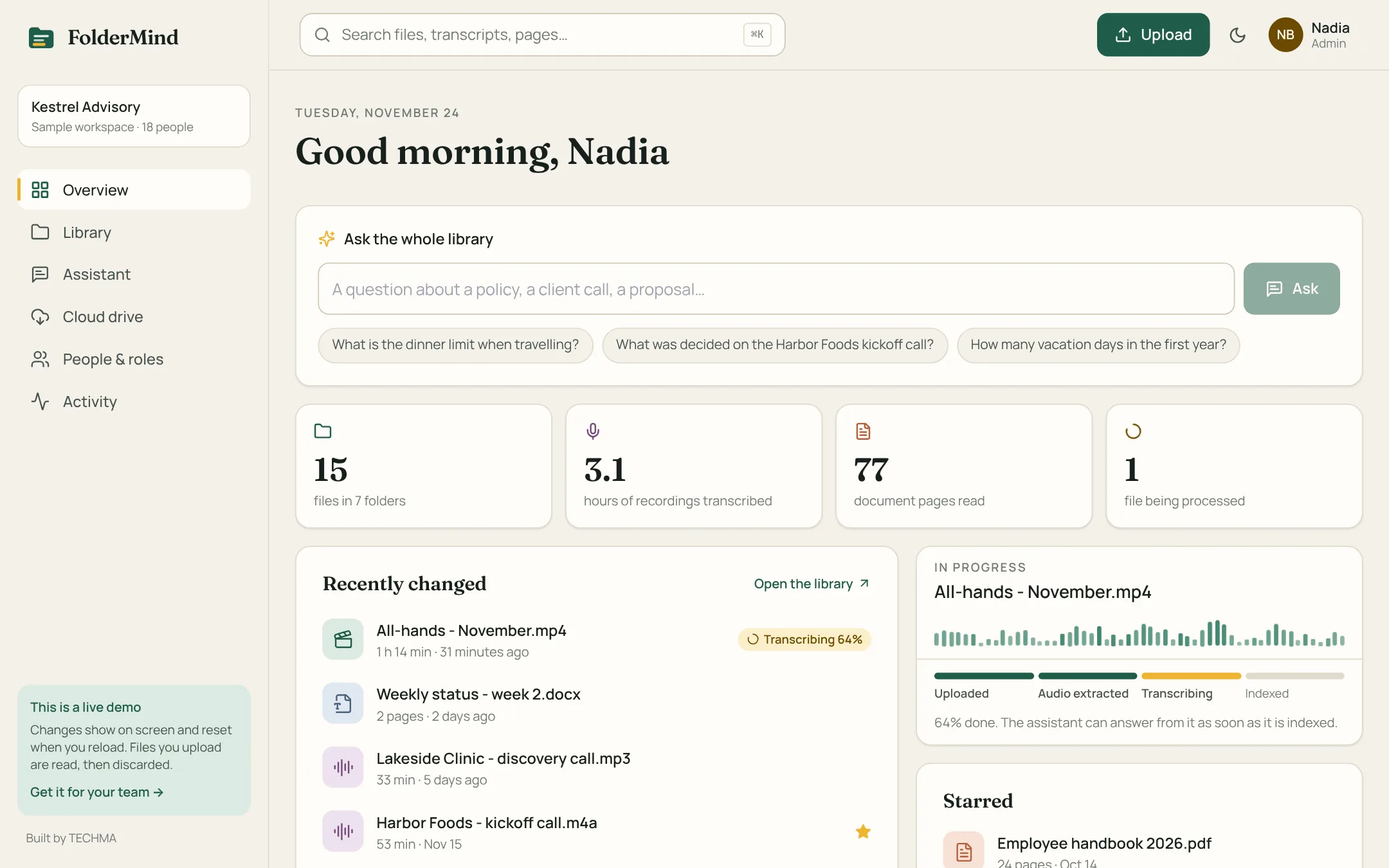
- 01OverviewWhat the library holds, what changed and what is being processed.
- 02Shared foldersFolders and files like the drive you know, with roles and colours.
- 03File readerRead any file as text, page by page, and find a word inside it.
- 04Meeting transcriptsCalls and videos turned into transcripts with speakers and timestamps.
- 05Cited assistantAsk in plain words. Every answer lists the passages it used.
- 06Search inside filesEvery word in documents and transcripts, not only file names.
- 07Cloud drive importPick files from Google Drive; FolderMind reads and indexes copies.
- 08People and rolesAdmin, editor and viewer, with a table of what each may do.
- 09Activity logEvery upload, move, deletion, import and question, with who and when.
For every question
Answers that show their work
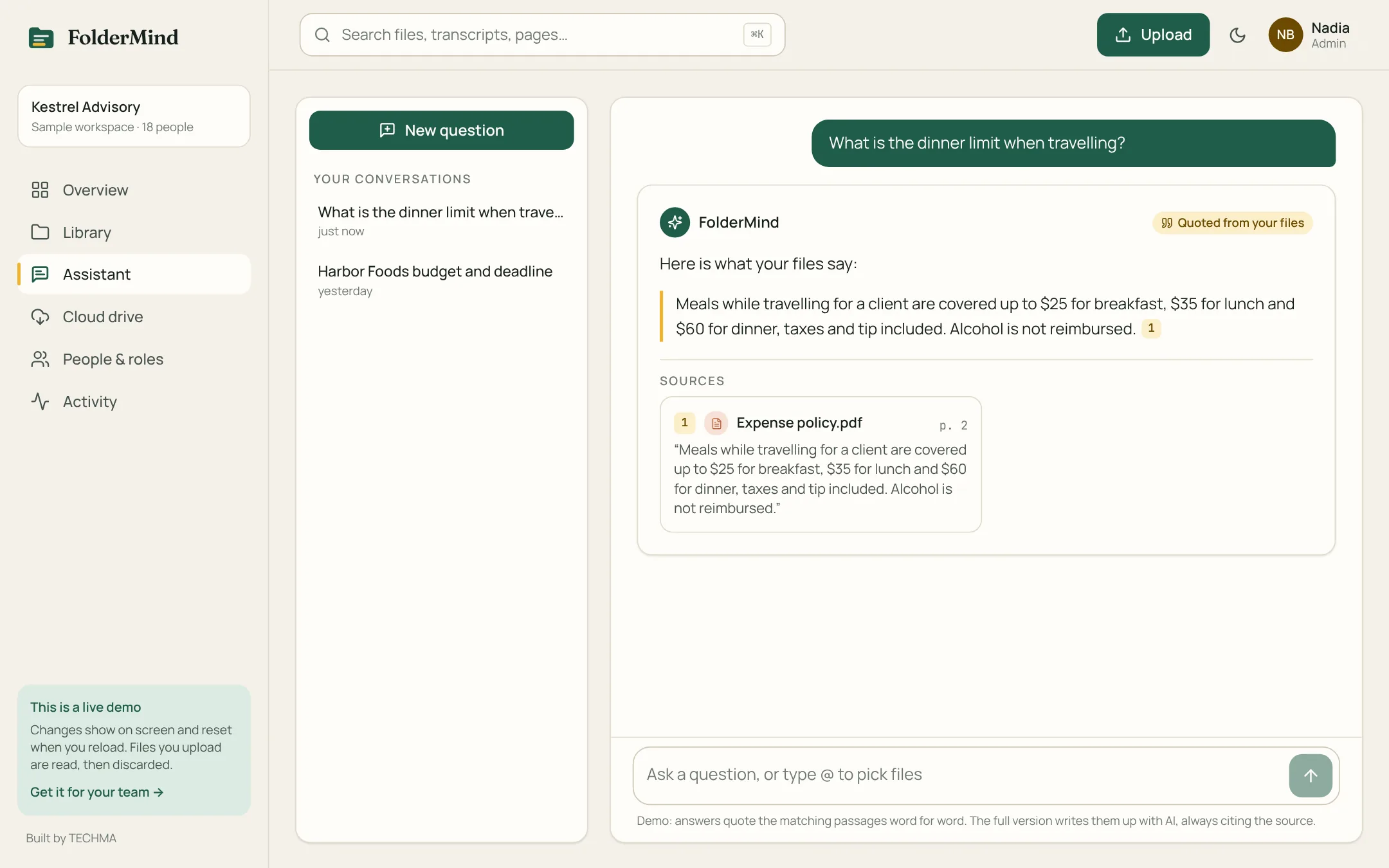
Ask in plain words. The assistant reads only your files, answers in a few sentences, and numbers every claim so you can open the passage it came from.
- Each source shows the file and the page or the minute
- Type @ to limit a question to specific files
- Says so when the files do not hold the answer
For every meeting
Recordings you can read
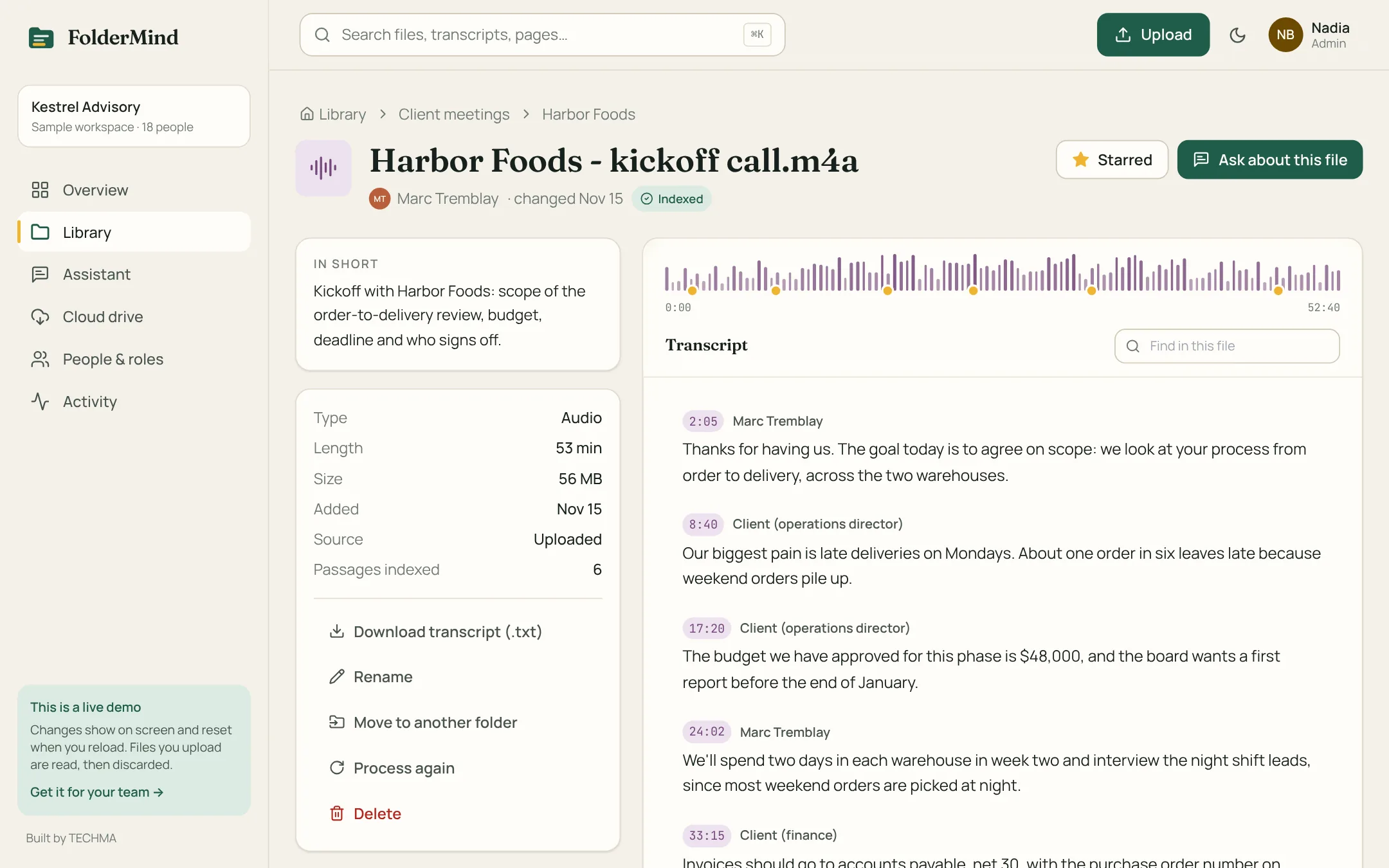
Calls and videos become transcripts with speakers and timestamps. Read them like a document, find a word, or jump to the minute from the waveform.
- Speaker turns and a timestamp on every passage
- Find in this file, with each match highlighted
- The assistant quotes recordings like any document
For the team
A shared drive that knows who you are
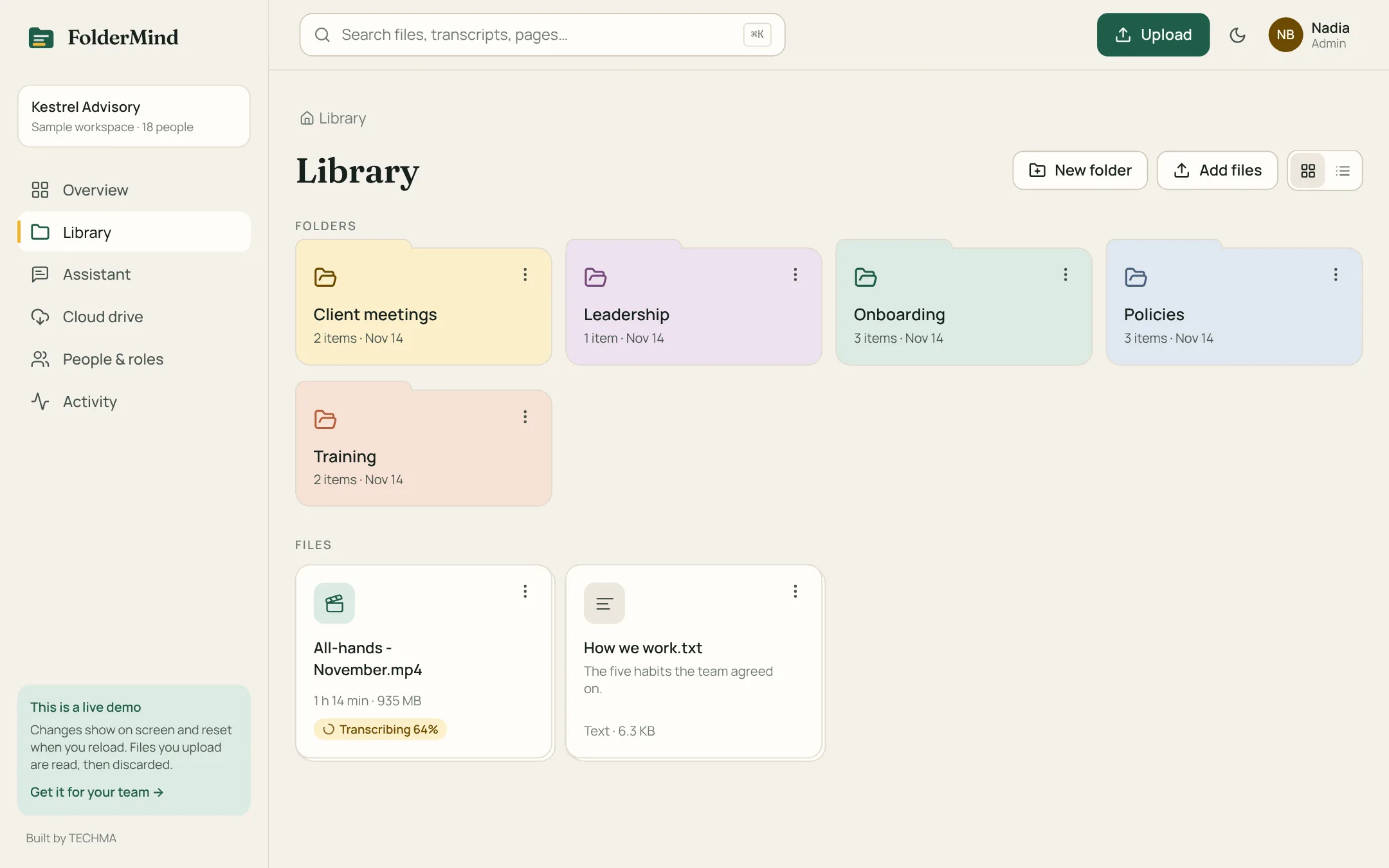
Folders and files like the drive your team already knows, with roles that decide who may upload, organize, delete or manage people.
- Coloured folders, cards or a list, star the files you use
- Admin, editor and viewer, with a table you can change
- An activity log of every upload, move and question
03The path
Four steps from a file to an answer
Every file follows the same path, and the team sees where each one stands.
- 1
Added
A file is uploaded or brought in from the cloud drive, into the folder of your choice.
- 2
Read
Text is extracted page by page; recordings are transcribed with speakers and timestamps.
- 3
Indexed
Each passage is indexed so search and the assistant can find it in a fraction of a second.
- 4
Answered
Questions are answered from those passages only, each answer with its sources.
04The teams
Made for teams whose knowledge lives in files and calls
Consulting firms
Proposals, client calls and deliverables, searchable by the whole team.
Read more02Law firms
Precedents, templates and client calls, with answers that cite the page.
Read more03Accounting firms
Policies, engagement letters and client meetings, searchable in season.
Read more04Clinic administration
Procedures, staff training and admin meetings, for the front desk and managers.
Read more05Training teams
Course videos and handouts that learners can question.
Read more06Non-profits
Grant files, board minutes and reports, for a team that changes often.
Read more05The offer
This is real software. Your team can have it.
FolderMind is one of the applications TECHMA has built for clients. If it fits your team, there are three ways to get it.
Buy the source code
You get the code of the app and run it yourself.
On quote
- Full source code of the application
- Setup instructions for your developers
- Host it where you want
- No licence per user
TECHMA builds yours
We start from FolderMind and shape it around your team.
On quote
- Your sources: drives, mail, CRM
- Your roles, folders and rules
- Transcription of your calls and meetings
- Training for your team and import of your files
Managed for you
TECHMA hosts, updates and supports the app. You use it.
On quote
- Hosting, backups and updates included
- Support when something is unclear
- Changes made on request
- One monthly invoice
06The notes
On keeping a team's files
07Free tools
Calculators, checklists and text builders
Small tools for the questions teams ask about their files and meetings. Free, no account, and what you type stays in your browser.
File naming convention generator
Free generator: fill in your date format, project codes, document types and versions to get a file naming convention your team can copy.
Read more02Meeting minutes generator
Free meeting minutes generator: fill in attendees, agenda, decisions and actions to get clean minutes you can copy into an email or a document.
Read more03Meeting notes time calculator
Free calculator: see how many hours a year your team spends writing meeting notes and minutes, from meetings per week and their length.
Read more04Shared drive cleanup checklist
Free checklist to clean up a shared drive: rules to keep, folder structure, duplicates, file names, access and how to keep it tidy afterward.
Read more05Time spent searching calculator
Free calculator: enter your team size, searches a day and minutes per search to see the hours a year spent looking for files and information.
Read more08The library
Articles, definitions and comparisons
What we have written to help a team get its files in order, whether or not it ends up using FolderMind.
Blog
New articles on keeping and searching a team's files.
Read more02Glossary
The words of documents, transcripts and AI search, in plain language.
Read more03Comparisons
A workspace next to a shared drive, a transcription app and a chatbot.
Read more04Regions
How TECHMA works with teams in each country and city.
Read moreQuestions
Asked before the first call
What is FolderMind?
FolderMind is a web application where a team keeps its files in shared folders. PDFs, Word files and text are read as they arrive; audio and video recordings are transcribed with speakers and timestamps. An assistant then answers questions from those files only, and every answer lists the passages it used.
Can I try it without creating an account?
Yes. The live demo opens in one click as an admin, an editor or a viewer of a fictional consulting firm. You can upload a document, move files, change roles and ask questions. Everything is reset when you reload, so you can try every button.
Who built FolderMind?
TECHMA designed and built it as a custom application for a client. The client's name and files are not shown. What you see is the same software with sample data and a new name.
Does it work with Google Drive?
Yes. A Google Drive account can be connected with read-only access, and the team picks the files to bring in. FolderMind copies, reads and indexes them; the originals stay where they are. In the demo the drive is a sample account.
Does the assistant make things up?
It is built not to. The assistant only receives the passages found in your files, must cite them, and says so when the files do not hold the answer. The public demo goes further: it quotes the matching passages word for word, with a few AI-written answers a day.
Is it available in French?
Yes. Every screen of the app exists in English and in French, and search understands both languages.
Can our team get this app?
Yes, in three ways: buy the source code, have TECHMA adapt it to your team, or let TECHMA host and manage it for you. The options are on the Get this app page; prices are on quote.
Live demo
Ask it something. Check the source.
FolderMind is a working application, not a mock-up. Open the sample library, read a meeting transcript, ask the assistant a question and follow its answer to the exact page or minute it came from.