FolderMind

FolderMind/Features/Search inside files

Search what is inside

One search box looks at file names, at every word in your documents and at every word said in your recordings.

One click, no account. You enter a sample firm as an admin, an editor or a viewer; the files are fictional and nothing you change is kept.

Search inside filesfoldermind.techma.ai
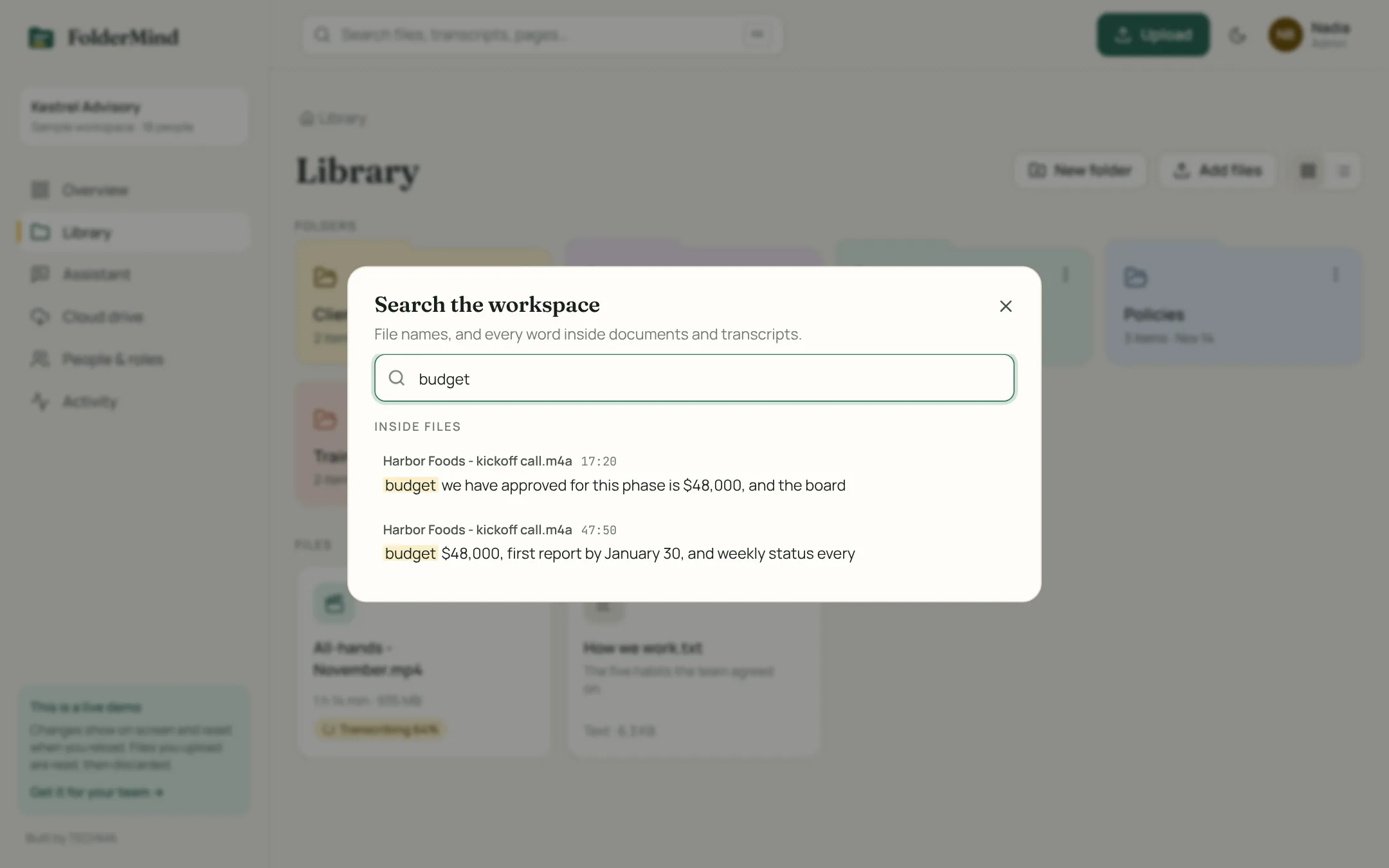
FolderMind search window listing matching files and passages from documents and transcripts with highlighted words

Names and contents

Results come in two groups: files whose name matches, and passages inside files, each with the word highlighted and its page or minute.

Search that understands the language

Search knows that budgets and budget are the same word, in English and in French. Put words in quotes for an exact phrase.

From anywhere

Press the search box or Ctrl K (⌘K on a Mac) from any screen. Click a passage and the file opens at that spot.

Search, then ask

Search finds where a word appears. When you need a sentence that answers a question, the assistant uses the same index and writes it up with sources.

Questions

Asked before the first call

Is it semantic search?

The demo uses full-text search, which is fast and exact. The original application adds embeddings for meaning-based search; a version built for you can combine both.

Live demo

Ask it something. Check the source.

FolderMind is a working application, not a mock-up. Open the sample library, read a meeting transcript, ask the assistant a question and follow its answer to the exact page or minute it came from.